
Your next client is searching right now
MyFitsy Coach puts you in front of people actively looking for a coach — and gives you everything you need the moment one says yes. Free, unlimited clients, and no commission on what you charge.


Where your next clients come from
The step almost every coaching tool skips.
Other software hands you a programme builder and wishes you luck finding someone to give it to. MyFitsy starts a step earlier: a public profile, listed in the search clients use to pick a coach.
- Clients come to you. They search nearest first, filter by speciality, language, price and rating, read the profiles, and apply from inside the app
- Your market is not the people who walk past your gym. Search covers any of 196 countries, and remote coaching is an ordinary connection here
- Nearest first, then by rating — placement is never for sale, so you are not outbid by whoever has the bigger marketing budget
- Your rates, stated up front, so the enquiries that reach you are from people who already know what you charge
- Reviews only real clients can leave — worth more than a screenshot of a testimonial
- Your own web address at
myfitsy.com/@yourhandle, to put wherever you already send people
It costs nothing to be listed. Write a bio — the one thing needed to appear publicly — set your rates, and you are discoverable on day one, following or no following.
What goes on a profile
| Specialisations | 32 to choose from |
| Countries | 196 |
| Price units | Per session, hour, course, week, month, programme, or one-time |
| Portfolio | Before/after case entries, up to 3 photos each side |
| Portfolio goal tags | 9 |
| Reviews | 1–5 stars, one per client, and you cannot delete a bad one |
| Search results | Up to 50, nearest first, then by rating |
| Listing fee and commission | None, and none |
Portfolio photos are public, so client permission is required before posting theirs — the terms are explicit about it. MyFitsy does not verify anybody's qualifications: you list your own, and clients are told to check them.
Then there is the other half of the job
Not a criticism of how you work. This is what happens when the planning tool, the training record and the schedule are three unrelated things.
You write the same programme five times
Four clients on a variation of the same upper/lower split, and four spreadsheets to keep in step with each other.
You find out whether they trained by asking
So you ask. Then you ask again. Then you decide it is easier to assume.
Your week lives in a chat app and a paper diary
Times agreed in messages, written down somewhere else, remembered nowhere.
Group training means doing everything twice over
The same booking typed out per person, the same programme assigned one client at a time.
Your first hour
Enough to be listed publicly and have one client training from a real programme.
- 1
Create a coach account
MyFitsy Coach is its own app. If you already train in MyFitsy, sign up here with the same email address, Apple ID or Google account: one login works in both.
- 2
Fill in your profile
Bio, experience, certifications, specialities, the gyms you work at, your city and your rates. This is what a prospective client reads before they apply, so it earns twenty minutes more than anything else on this list.
- 3
Build one programme
Days, then exercises within each day. Start with the plan you already give most people — or import it from a PDF, a photo or pasted text.
- 4
Get your first client
Accept someone who applied through search, or invite a client you already train. Consent is required both ways, so nothing is shared until they agree.
- 5
Assign the programme
Pick the client, the start date, and which day they begin on — someone joining mid-cycle is not pushed back to day one.
- 6
Book the week
Tap the slots you train them and add a note to each. Set it to repeat if it is a standing appointment.
Build a programme once, give it to everyone it suits
- Weights, bodyweight and cardio. A pull-up and a 5 km run are both first-class, not a lift with empty fields
- Reps as free text, so 8–10 and AMRAP both work, alongside target weight, rest, a form note and a video link
- Pick from 412 exercises, each with a short animation your client can watch mid-set, so a movement you would otherwise have to demonstrate in person explains itself
- Type the first letters and exercises you have used before are offered, video link included — the second programme is far quicker than the first
- Import the programmes you already have. A PDF, photos of a printed plan or pasted text becomes a programme you can edit and assign. One import uses one credit
- Supersets in one tap between neighbouring exercises
- Assign to a client or a whole group, starting on whichever day of the plan suits them
- Each assignment is independent, so one client's progress never touches another's
Behaviour worth knowing
Assigning does not cancel anything. Giving a client a new programme leaves their existing ones running, so someone can be on a main plan and a supplementary one at once. A programme ends when you end it, or when the coaching relationship does.
Duplicates are refused. Assigning the same programme twice to one client is blocked outright — it would only clutter their plan. Push to a group and anyone who already has it is skipped, with the confirmation telling you how many.
You cannot edit a client's log. You write the plan; they record what happened. Keeping those apart is what makes their log worth reading.
Deleting a programme never deletes the workouts logged on it. A client's workout history is theirs: only they can delete it, a session at a time or with their account.
Check an import before you assign it. It arrives as an ordinary programme, to read through and edit like one you typed.
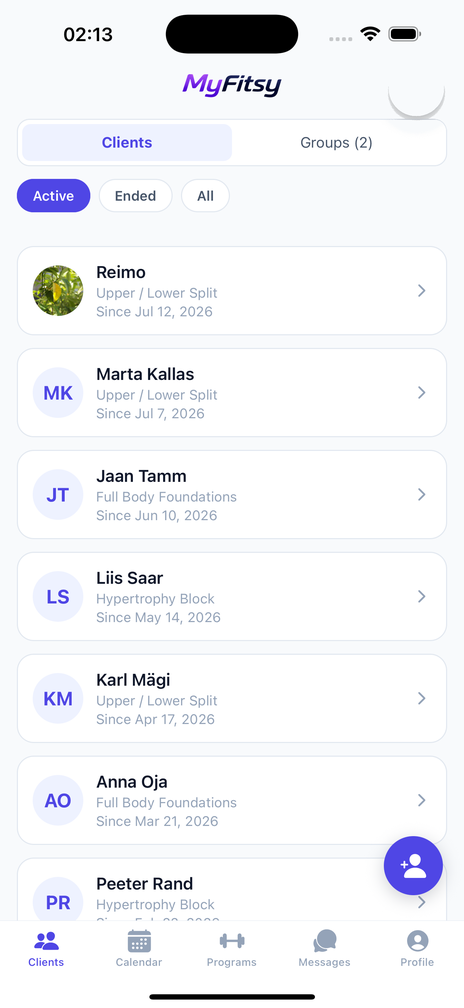
Clients & groups
Run your week from one screen
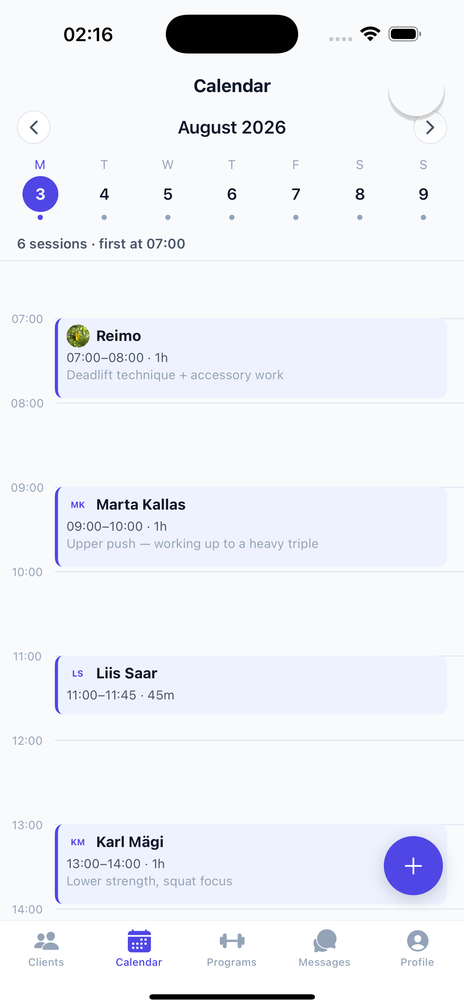
Coach calendar
- Tap a gap to book it. An hour-by-hour grid from 05:00 to 23:00, with a dot on every day of the week strip that has sessions
- A note on every session — “assessment”, “deadlift technique”, “week 3 return to training” — visible to you and to them
- Weekly repeats for a preset run of weeks or any number you choose, and every occurrence stays individually movable
- Clashes are caught before you confirm, with an override for when you genuinely want two at once
- A busy morning never looks like an empty day — switching days scrolls to the first booking
Scheduling specifics
| Grid | 05:00–23:00, quarter-hour start times |
| Duration | 30/45/60/90 min presets, or anything from 5 to 600 |
| Weekly repeat | 4, 8, 12 or 24 weeks, or a custom run up to 52 |
| Note per session | Up to 500 characters |
| Editing a series | Asks whether you mean this session or all later ones |
| Who can book | You. Clients see their sessions read-only |
Groups, without doing everything five times
The part that scales badly everywhere else.
- One booking for the whole group. On your calendar it collapses to a single block with the group name and a head count, not five stacked ones
- Move it and everyone moves, each of them notified. Cancelling works the same way
- One action pushes a programme to every member, duplicates skipped
- Members never see each other. A client sees the group's name and never the attendee list — their membership of your bootcamp is not something they agreed to share
- No caps. Groups, members, clients, programmes — none of them are limited, and all of them are free
A room is the other thing, and it is deliberately the opposite. When you want a set of clients actually talking — a bootcamp, a challenge, four people training for the same race — you can put them in a room together. Everyone in it sees the others' names and what they write, which is the point of a room and precisely why a training group does not work that way. You choose who is in it, you can remove anyone, and anyone can leave.
See what they actually did
- The weights they used, against the exercise you prescribed — so you can tell whether the load is moving without asking
- “Did it lighter” and “skipped it” are different things, and the app records which
- Fifteen measurements and a rate of change. When a client says nothing is happening, this is the screen that settles it
- Their latest workouts first, with every earlier one in Workout history and every finished programme in Program history
- Come-back reminders for clients who have gone quiet — rate-limited, and never sent to anyone who opted out
- Message them where the training is, with photos and video for form checks, and unread counts on the tab bar
- An activity feed of completed workouts, updated measurements, accepted applications and new reviews, written when the event happens
- Metric or imperial, per account — you can work in kilograms while a client reads the same session in pounds
- Report or block anyone from their profile — reporting reaches a moderator, blocking stops the contact immediately
What you can see, and for how long. Only clients who accepted a connection with you. When coaching ends, you keep their measurements and workouts up to that day and see nothing newer; a request still waiting or declined shows you nothing. Never their goals, never their messages with another coach, and nothing they logged is editable by you.
What it costs you
| The coach app | Free |
| Clients | Unlimited |
| Programmes and groups | Unlimited |
| Listing in coach search | Free |
| AI programme import | 1 credit per import |
| Commission on your coaching fees | None — MyFitsy does not touch the money |
| Adverts | None |
| Card details to get started | None |
You invoice your clients however you already do, and keep all of it. Clients subscribe on their own side — $4.99 a month after two weeks free. The one thing a coach can buy is credits for AI programme import, and only if you use it. See Pricing.
This is built for you if
You want more clients
A profile in a search people actually use, in 196 countries, that costs nothing to list and cannot be outbid.
You reuse programmes
Two or three clients on variations of the same plan is the point at which spreadsheets start drifting apart.
You want to stop chasing numbers
If you are asking clients what they lifted, you are programming on guesswork.
You run group sessions
Bootcamps and small groups are where per-person admin quietly eats your week.
Questions coaches ask
How do clients find me?
What does it cost me?
Can I bring in programmes I already have?
Who sees the pages I import?
Do you take a percentage of my fees?
How many clients can I have?
Do my clients have to install something?
Can I use it with only some of my clients?
Can I reuse a programme across clients?
If I assign a new programme, does the old one stop?
Can I edit a client's logged weights?
What if two sessions overlap?
Can I move one session in a weekly series?
Do group members see each other?
Can I delete a bad review?
Does MyFitsy verify my certifications?
What happens to everything if I stop using MyFitsy?
Get listed, and try it with one client
Free, unlimited clients, and no commission on anything you charge.